How to Use TradingView Algo Signals for Futures and Manage Risk
A TradingView algo for futures applies coded rules to chart data to generate signals or manage parts of a trade. It does not remove your responsibility to confirm setups, plan risk, and control execution. Treat each signal as a decision point, not an instruction: wait for the bar to close, consider other indicators and market context, and account for how changing volatility can affect signal frequency and stop placement. This guide explains how futures algorithms work, how to assess signals, what to review as volatility shifts, and how to plan for risks such as slippage, connection issues, and missed alerts, so you can build a disciplined process rather than rely on a tool blindly.
Key Takeaways
- Set your risk limits and plan for technical disruptions before entering a futures trade.
- Confirm indicator signals with market context instead of treating every alert as an instruction.
- Account for changing volatility when evaluating signal frequency and stop placement.
- Test automated rules with realistic execution assumptions before relying on them in live trading.
Risk management and technical-failure risks
- Set the loss limit before entry. Futures and options trading involves a substantial risk of loss, so use risk capital only. Keep planned risk below 1% per trade, and size the position from the distance to its protective stop. For example, a wider stop requires fewer contracts if your dollar risk stays fixed. Don’t let an attractive signal dictate your exposure.
- Define the protective stop in advance. Some strategies calculate a stop using the composite range and a configurable ATR multiplier. This ties stop distance to measured market movement, but does not eliminate risk. Review historical data across different volatility conditions, then assess whether the stop fits the futures contract and your planned loss limit.
- Write down breakeven and trailing rules. One rule set moves the stop to average entry after a 1% favorable price move. Another moves the stop to breakeven when Level 1 is reached, then trails the remaining position with an ATR-based stop after Level 2. Treat these as strategy-specific rules, not universal instructions. Define which rule governs each setup before entry.
- Use bracket orders to control execution. When your platform and broker support them, pair an entry with a protective stop and planned exit levels. Before sending, confirm the order quantity, contract, and stop direction. A stop can limit intended exposure, but fast markets, slippage, or a rejected order can affect the fill. Recheck the live order after execution.
- Plan for alerts and connection failures. A TradingView alert or webhook can report entries, exits, partial exits at Level 1 and Level 2, and trailing-stop triggers. An alert reports an event; it doesn’t guarantee an order reached the broker. Keep a clear response plan for lost connectivity, stale alerts, or platform errors, and record each issue during review.
Technical indicators and signal confirmation
There is no universally best futures indicator. Choose tools that assess distinct conditions, combine them thoughtfully, and set a clear confirmation rule for each setup.
-
How a TradingView Algo Provider Selects Indicators for Futures Strategies
Choose indicators that measure different parts of a futures setup, not several versions of the same signal. Check whether each tool clarifies trend, participation, volatility, or market regime. A momentum and participation oscillator can evaluate price relative to a 50-period EMA. Volume comparisons can use a 20-bar average, while an ATR ratio can be measured against its 50-bar average. ADX can help classify Strong Trend, Trending, Neutral, and Choppy conditions. Keep each indicator’s role clear, and avoid giving duplicate signals extra weight.
-
How a TradingView Algo Provider Combines Indicators for a YM Setup
For a YM setup, combine a directional condition with evidence of participation and a defined market regime. For example, assess whether price action aligns with the trend measure, then check volume against its 20-bar average. Use ADX-based regime detection to distinguish trending conditions from choppy ones. Require at least two independent signals before treating the setup as confirmed. This approach filters out agreement that only comes from indicators measuring similar inputs. Confirm signals after the bar closes, not while its price is still changing.
-
How a TradingView Algo Provider Sets Indicator Alerts for Confirmation
Set alerts to report the specific confirmation event the strategy requires, such as a qualifying signal after a bar closes. Keep entry alerts distinct from exit or partial-exit alerts, so each message has a clear meaning. Check the selected market, timeframe, and condition before enabling alerts. A professional can configure webhook messages for entries, position exits, partial exits, and trailing-stop triggers. Treat an alert as information to assess, not proof that an order executed. For structured indicator and market analysis guidance, connect alerts to a written confirmation process.
How a TradingView Algo Provider Adjusts Signal Frequency to Volatility
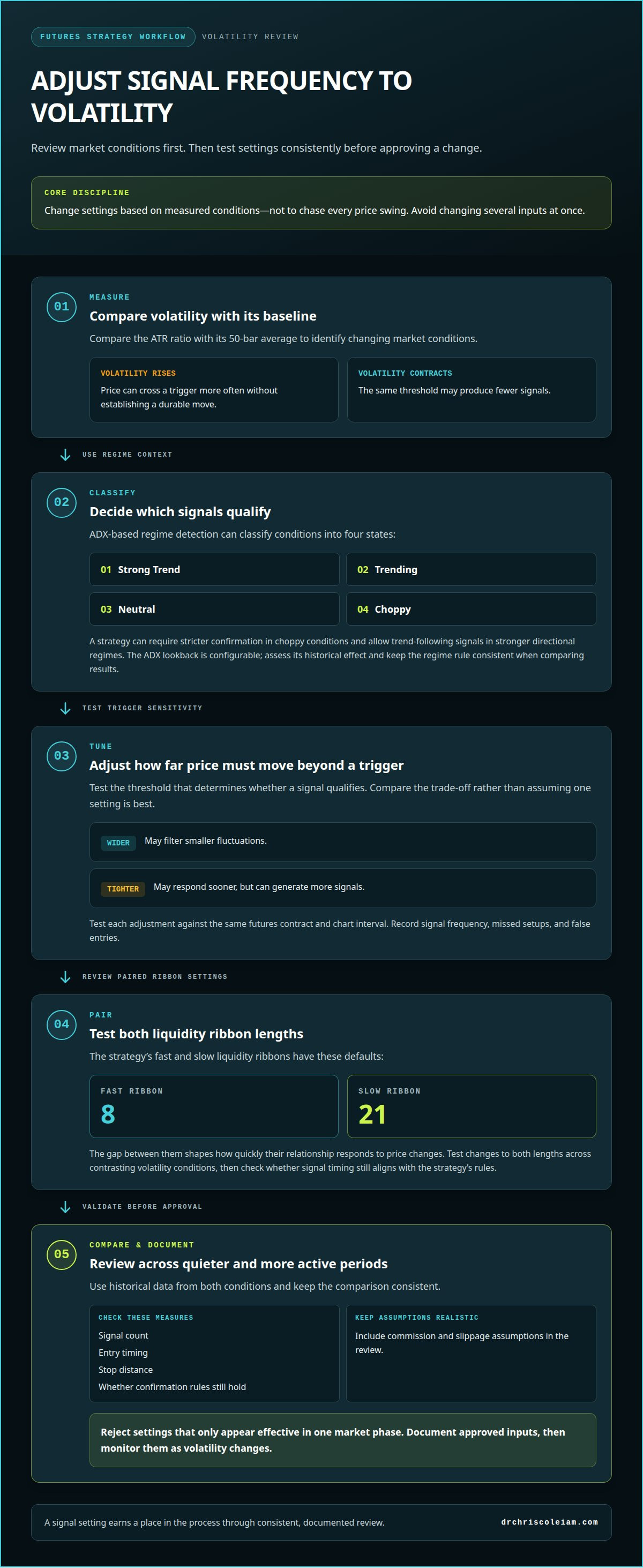
- Measure volatility before changing signal rules. Compare the ATR ratio with its 50-bar average to identify changing market conditions. When volatility rises, price can cross a trigger more often without establishing a durable move. When volatility contracts, the same threshold may produce fewer signals. A professional uses this analysis to decide which settings need adjustment, rather than changing several inputs at once.
- Use market regime to control which signals qualify. ADX-based regime detection can classify conditions as Strong Trend, Trending, Neutral, or Choppy. A strategy can require stricter confirmation in choppy conditions and allow trend-following signals in stronger directional regimes. The ADX lookback is configurable, so assess its effect on historical data before changing it. Keep the regime rule consistent when comparing results.
- Adjust thresholds without chasing every price swing. A strategy can set how far price must move beyond a trigger before a signal qualifies. Wider thresholds may filter smaller fluctuations; tighter ones may respond sooner but generate more signals. Test each adjustment against the same futures contract and chart interval. Record signal frequency, missed setups, and false entries.
- Review ribbon lengths as a paired setting. A strategy’s fast liquidity ribbon defaults to 8, while its slow ribbon defaults to 21. The gap between them shapes how quickly their relationship responds to price changes. A professional tests changes to both lengths across contrasting volatility conditions, then checks whether signal timing remains aligned with the strategy’s rules.
- Compare results before approving an adjustment. Use historical data from both quieter and more active periods. Assess signal count, entry timing, stop distance, and whether confirmation rules still hold. Include realistic commission and slippage assumptions in your review. Reject settings that only appear effective in one market phase. Document approved inputs, then monitor how volatility affects live signals.
Automated and algorithmic trading
TradingView can generate strategy signals and alerts, but execution depends on a connected broker or alert integration. Broker access and margin requirements vary by account, contract, and provider, so no single U.S. amount applies to every futures trade.
- Separate signal generation from order execution. A TradingView strategy can identify an entry or exit condition without placing a broker order. Determine whether your setup sends orders through a supported connection or only generates alerts. That distinction determines what must act after a signal.
- Map each alert to a precise instruction. A provider can configure webhook alerts for entries, position exits, partial exits at Level 1 and Level 2, and trailing-stop triggers. The receiving integration must translate each message into the intended contract, side, quantity, and order type. Test the message path before relying on live execution.
- Account for contract values in performance reviews. A 10-point move therefore represents different dollar exposure across those contracts. Check the selected contract and quantity before interpreting a strategy’s profit or loss.
- Review execution settings. Check the selected contract and quantity in Strategy Properties before reviewing results. Treat displayed results as incomplete until you confirm that your settings reflect the execution plan you intend to test.
- Understand margin requirements. Margin is collateral for an open position, and requirements can differ by contract and broker. Check the requirements for your selected contract and account when planning exposure.
- Test automation before live deployment. Paper trade the alert and execution path, then compare fills with the signal timestamps. Check rejected orders, duplicate messages, and position mismatches. Explore futures algo tools as you build a disciplined process for alerts and execution.
Margin is collateral for an open position, and requirements vary by broker and contract. Check the requirements for your selected contract as part of planning your exposure.
Dr. Chris Cole IAM: Dr. Cole’s TradingView Algos
Dr. Chris Cole IAM offers Dr. Cole’s TradingView Algos to help traders structure signals for futures decisions. These tools can support a trading framework alongside your own confirmation, execution, and risk rules, not replace them.
For added market context, Daily Auric Levels cover Gold, Nasdaq, and S&P 500 Futures. The Auric Trading Assistant and Auric Options Levels for GLD, QQQ, and SPY support analysis across the related markets. Keep your process clear: identify the setup, assess the signal against market conditions, and follow your predetermined risk plan.
Contact Dr. Chris Cole IAM to discuss how Dr. Cole’s TradingView Algos can fit into your trading process.
Make Your Next Trading Decision Deliberate
Turn indicator use into a process you can review and refine. Define what evidence earns your attention, what invalidates a setup, and how you will respond when market conditions change. A TradingView algo for futures can organize those decisions, but execution still depends on disciplined judgment and planned risk.
Dr. Chris Cole IAM offers a trading community, Daily Auric Levels for Gold, Nasdaq, and S&P 500 Futures, and Auric Options Levels for GLD, QQQ, and SPY. Dr. Cole’s work developing trading algorithms for retail and institutional settings informs educational tools for traders building a structured approach.
If you’re ready to discuss how these resources may fit your process, contact Dr. Chris Cole IAM. Keep learning, review your decisions honestly, and grow as a trader.
Frequently Asked Questions
What is Automated Trading?
Automated trading uses coded rules to identify market conditions and generate actions, such as an entry alert or exit signal. For example, a system might respond when price and an indicator meet preset conditions. Automation handles defined tasks; it cannot determine whether those rules suit your goals, account, or risk tolerance. You remain responsible for oversight and trading decisions.
Can TradingView automate futures trading with Pine Script?
Yes. Pine Script can define futures strategy conditions, evaluate them against chart data, and create alerts when conditions occur. A TradingView algo for futures can support analysis and signal workflows, but script alerts alone do not guarantee broker execution. The workflow needs a suitable order connection or external integration, plus clear rules for handling alerts, order status, and errors.
How does a TradingView algo provider create and backtest a futures strategy?
A strategy translates a trading idea into explicit entry, exit, and position rules, then tests them against historical chart data. A careful review checks behavior across distinct market conditions and verifies that signals do not rely on future information. It also assesses whether the strategy’s assumptions match the intended contract, chart interval, and execution method.
Can TradingView strategies place live futures orders automatically?
Automated live orders may be possible when a strategy is connected to a compatible broker workflow or external execution system. The process depends on the connection: some setups send orders through an integration, while others send alerts for another system to process. Confirm that each alert maps to the intended contract, direction, quantity, and order type.
How do futures contract tick sizes and point values affect TradingView backtests?
Tick size is the smallest permitted price movement, while point value converts price movement into a contract’s dollar change. Together, they determine the value of each minimum price increment and the modeled impact of a trade. A mismatch in chart symbol, contract value, or quantity can misstate backtest outcomes and position exposure.
What are the risks and limitations of using TradingView algos for futures?
Futures trading carries substantial risk, and an algorithm cannot eliminate market or execution uncertainty. Historical results may differ from live trading as fills, slippage, interruptions, and market behavior change. A strategy may also perform poorly when conditions shift from those represented in its tests. Use risk capital only, monitor automated processes, and remember that past performance does not guarantee future results.